Declaring an Incident
How to create an incident record with severity, playbook, and lead assignment.
Declaring an incident in CrownSync Playbooks creates a formal record that activates the response process, starts the timeline clock, and ensures all actions are logged for regulatory and audit purposes. Knowing when and how to declare an incident is critical to an effective response.
When to Declare an Incident
Not every security event warrants a formal incident declaration. You should declare an incident when:
- A security event has been confirmed or is strongly suspected to have caused harm to systems, data, or operations
- Personal data may have been compromised, lost, or accessed without authorisation
- A threat actor is actively present in your environment
- Business operations are disrupted or at risk of disruption due to a cyber event
- A regulatory notification obligation may be triggered
- Your incident response plan or playbook needs to be activated
If you are unsure whether an event warrants a declaration, err on the side of caution. It is better to declare and then downgrade the severity than to delay and miss a regulatory deadline.
ICO 72-hour deadline
Under UK GDPR, you must notify the Information Commissioner's Office within 72 hours of becoming aware of a personal data breach that poses a risk to individuals' rights and freedoms. The clock starts from the moment you become aware, not from when the incident is declared in CrownSync. Declare early and assess reportability as your first action. See regulatory deadlines for full details.
Severity Definitions
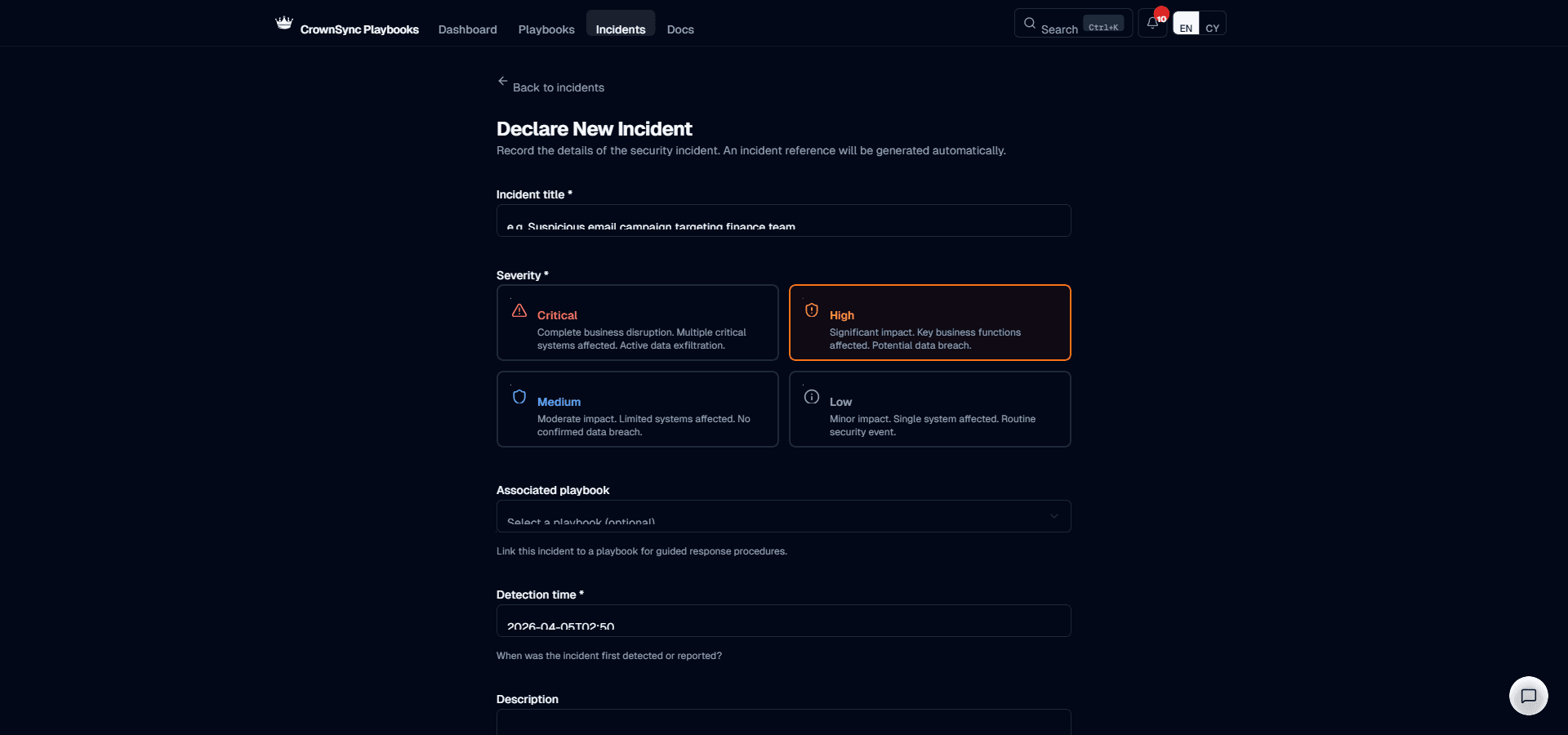
When declaring an incident, you must assign a severity level. CrownSync uses four severity levels aligned with common UK incident response frameworks:
- Critical — Immediate, significant impact on core business operations or large-scale personal data breach. The organisation cannot operate normally. Examples: ransomware encrypting production systems, mass exfiltration of customer data, complete loss of critical infrastructure.
- High — Serious impact on important business functions or confirmed breach of sensitive data affecting a limited number of individuals. Requires urgent response. Examples: business email compromise with confirmed financial loss, targeted data theft from a specific system, compromise of privileged accounts.
- Medium — Moderate impact on non-critical systems or a potential breach that has been contained but requires investigation. Normal business operations continue with some restrictions. Examples: malware detected on a workstation that has been isolated, phishing campaign with some credential submissions but no confirmed access.
- Low — Minor impact with no confirmed data breach and limited disruption. The event is contained and requires documentation rather than emergency response. Examples: blocked phishing attempt with no clicks, policy violation by an employee with no external impact, failed brute force attack.
| Severity | Description | Typical Response Time |
|---|---|---|
| Critical | Complete business disruption. Active data exfiltration. | Immediate |
| High | Significant impact. Key business functions affected. | Within 1 hour |
| Medium | Moderate impact. Limited systems affected. | Within 4 hours |
| Low | Minor impact. Single system. Routine security event. | Within 24 hours |
The severity level can be changed at any time during the incident as more information becomes available. Changes are logged in the timeline.
Choosing the Right Playbook
When creating an incident record, you are prompted to select the playbook that best matches the incident type. The system suggests playbooks based on the incident description you provide, but you can select any playbook from your active library. If the incident spans multiple categories (for example, a phishing attack leading to ransomware), choose the playbook for the most pressing threat and reference additional playbooks as needed.
Setting the Detection Time
The detection time records when the incident was first identified. This is distinct from when the incident is declared in CrownSync, as there may be a delay between initial detection and formal declaration. The detection time is used to calculate regulatory deadline windows, so it must be accurate.
If the exact detection time is not known, use your best estimate and add a note to the timeline explaining the uncertainty. You can update the detection time later if more precise information becomes available.
Appointing an Incident Lead
Every incident must have an appointed lead — the person responsible for coordinating the response. The incident lead is typically a senior member of the IT or security team, but the choice depends on your organisation's incident command model (as configured in your organisation profile).
The incident lead is responsible for:
- Coordinating the response team and assigning actions
- Making key decisions and recording them in the timeline
- Communicating with senior management and stakeholders
- Ensuring regulatory notifications are made within the required timeframes
- Authorising the transition between response phases
The lead can be reassigned during the incident if shifts change or if a different expertise is needed. All lead changes are recorded in the incident timeline.
Was this page helpful?