Quick Start Guide
Get up and running in 10 minutes with this step-by-step guide.
Overview
This guide walks you through getting up and running with CrownSync Playbooks from account creation to exploring your first playbook. The entire process takes less than ten minutes.
Tip
Create Your Account
Visit pb.crownsync.uk/sign-up to create your CrownSync account. You can sign up using your work email address or use single sign-on via Google or Microsoft. If your organisation already uses CrownSync CE Readiness, you can use the same account — your credentials work across both products.
After verifying your email address, you will be taken directly into the onboarding wizard to set up your organisation.
Complete the Onboarding Wizard
The onboarding wizard collects the information CrownSync needs to personalise your playbooks. It consists of six steps:
- Find your organisation — search Companies House by name or company number. If your organisation is not registered at Companies House (for example, an NHS trust or charity), you can enter your details manually.
- Confirm your sector — select your primary sector from the list. Your sector determines which regulatory requirements (ICO, FCA, PRA, SRA, DSPT) are applied to your playbooks and which communication templates are included.
- Technology stack — tell us which tools you use for SIEM, EDR, email, cloud, identity management, and IT service management. This ensures playbook instructions reference your actual tools rather than generic placeholders.
- Organisation context — provide your approximate employee count, whether your IT is managed in-house, outsourced, or hybrid, whether you have a Data Protection Officer, and whether you hold cyber insurance.
- Incident command structure — choose the command model that fits your organisation: Simple (a single incident lead), Silver/Gold (common in UK public sector and larger organisations), or Full (multiple functional roles for complex incident management).
- Review and confirm — check everything looks correct, then submit. Your playbooks are personalised immediately.
For a detailed explanation of each step, see the Account Setup & Onboarding guide.
Explore Your Personalised Dashboard
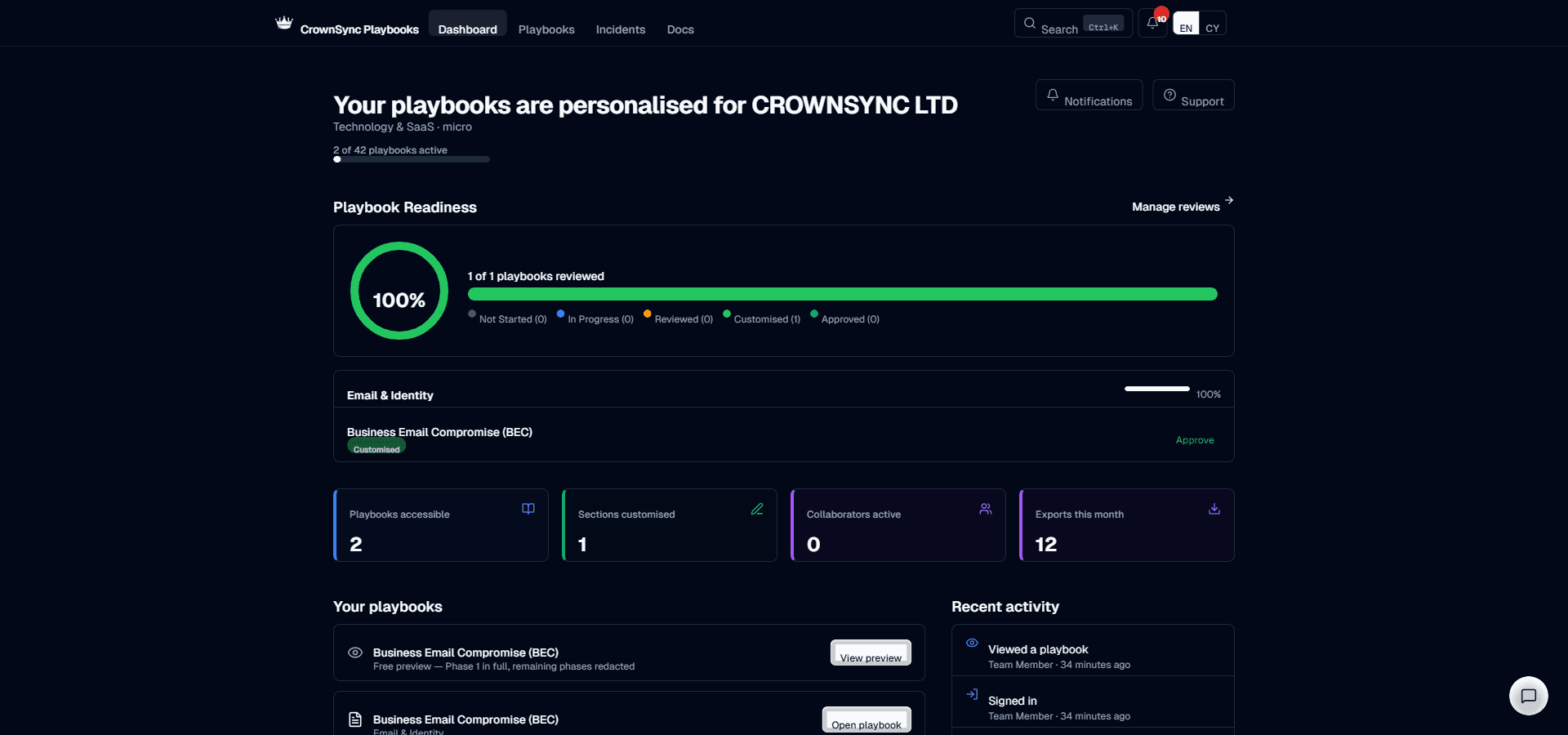
After completing onboarding, you land on your personalised dashboard. Here you will find:
- Readiness score — a summary of how many playbooks your organisation has reviewed and customised.
- Recent activity — a feed showing edits, new incidents, drill results, and team activity.
- Quick actions — shortcuts to declare an incident, start a drill, or browse the playbook library.
- Regulatory deadlines — if any incidents are open, you will see countdown timers for ICO, FCA, and other reporting deadlines.
See the Dashboard Overview for a full walkthrough.
Explore All 42 Playbooks
During your 14-day trial, all 42 playbooks are fully accessible. Navigate to the playbook library from the sidebar to browse the complete catalogue. Each playbook is personalised to your organisation's sector, technology stack, and regulatory obligations.
After the trial, subscribe to maintain full access to all playbooks, PDF exports, drill testing, incident logging, and communication templates. See the Subscription Management page for details.
Invite Your Team
CrownSync Playbooks is designed for collaboration. Once your organisation is set up, invite your colleagues so they can view, edit, and contribute to your playbooks. You can assign three roles:
- Owner — full access including billing and organisation deletion.
- Admin — can manage team members, edit playbooks, run drills, and manage incidents.
- Member — can view and edit playbooks, log incident actions, and participate in drills.
To invite team members, go to Admin → Team Management and enter their email addresses. They will receive an invitation email with a link to join your organisation. See Inviting Team Members for full instructions.
Information
What to Do Next
Now that your organisation is set up and your team is invited, here are the recommended next steps:
- Browse the playbook library and review the playbooks most relevant to your risk profile.
- Customise your first playbook by editing sections to match your internal processes and contact details.
- Run a tabletop drill to test your team's readiness and generate your first drill report.
- Review communication templates and personalise them with your organisation's details.
- Set up integrations with your ITSM platform and SIEM for automated incident workflows.
- Invite external collaborators if you work with consultants or third-party incident responders.
- Explore the audit log to understand the compliance evidence trail that CrownSync generates automatically.
Was this page helpful?